Data sampling
Now that we have converted our raw text into tokens, the next step will be to convert those tokens into embeddings, which are essentially multi-dimensional vectors that the model can actually work with mathematically. We will examine embeddings in a later chapter.
But first, let’s look at how we are going to feed the model its input data.
The commonly used pattern here is the Dataset and the DataLoader: two data abstraction classes that encapsulate and manage the input data used during training. Think of them as the pipeline that delivers data to the model in a clean, structured way. We will discuss them in detail in a later section. For now, the general idea is that we use them to load the data for the pretraining loop, which is essentially a sliding window.
How LLMs learn: the sliding window
Section titled “How LLMs learn: the sliding window”LLMs are pretrained by doing one thing repeatedly: predicting the next word in a text.
Pretraining is essentially a loop, a sliding window loop.
As we move through the text with a fixed-size window, called the context size, we hide the next word and ask the model to predict it. That hidden word is called the target.
Then we slide forward by one word. The word we just predicted becomes part of the input, and we ask the model to predict the next hidden target. We repeat this process across the entire dataset.
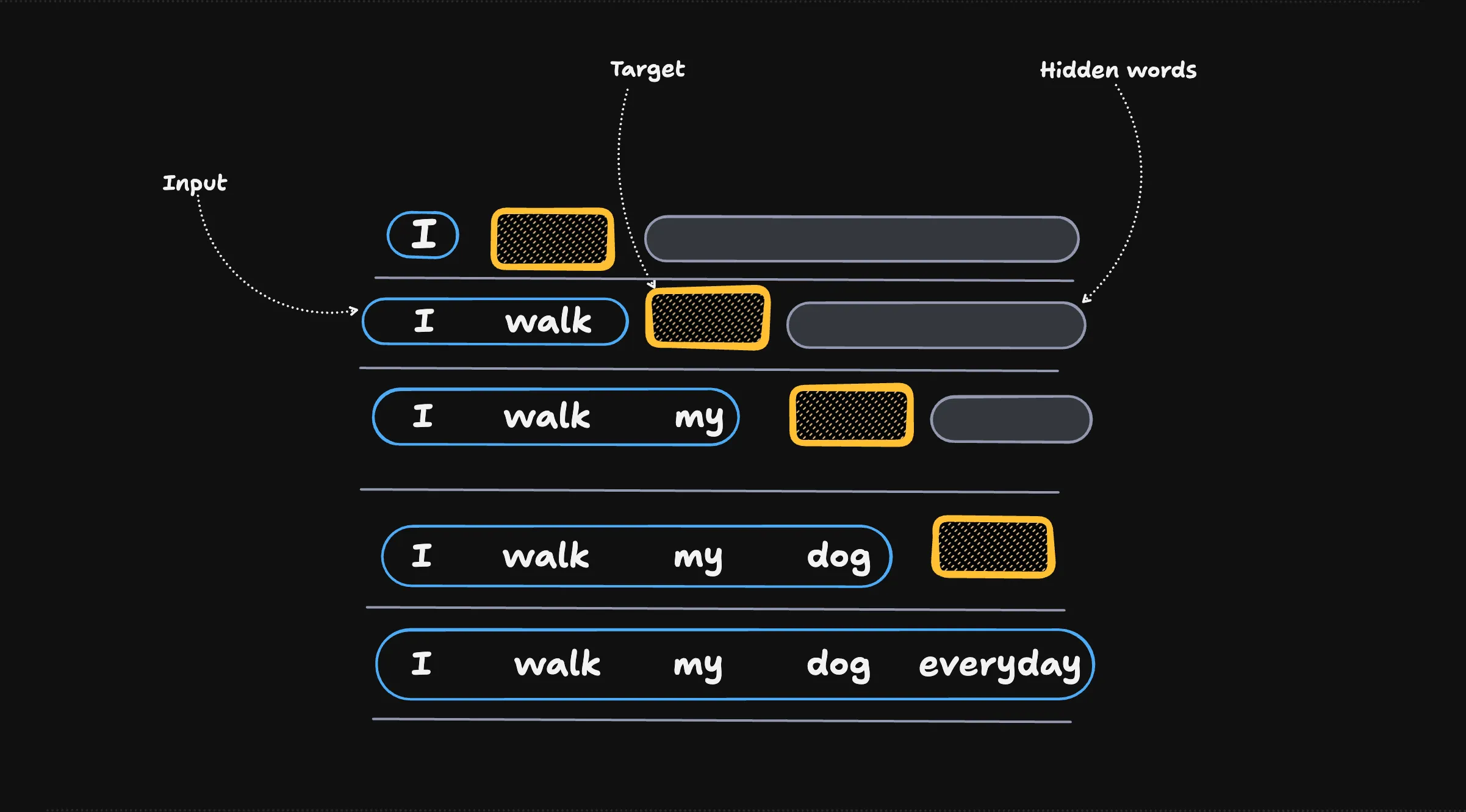
Input and target arrays
Section titled “Input and target arrays”With that in mind, we can split our data into two arrays:
- Input: the array of token sequences the model reads.
- Target: the exact same token array, but shifted by one position.
The target is simply what the model is trying to predict at each step.
We can see this shift directly. We encode a sentence, take the first contextSize tokens as the input, and take the same slice shifted right by one as the target:
import { encode as gptEncode } from "gpt-tokenizer";
const ids = gptEncode("I walk my dog everyday before the city wakes up");
const contextSize = 4;const input = ids.slice(0, contextSize);const target = ids.slice(1, contextSize + 1);
console.log("input: ", input);console.log("target:", target);
Because target is input shifted one step to the right, each position’s label is exactly the token that comes next.
The runnable practice code lives at packages/chapters/src/ch02-tokenizer/03-data-sampling.ts.
PyTorch → JS mapping
Section titled “PyTorch → JS mapping”| Reference (Python) | Here (TypeScript) |
|---|---|
ids[:context_size] |
ids.slice(0, contextSize) |
ids[1:context_size+1] |
ids.slice(1, contextSize + 1) |
- Pretraining is a sliding window loop: predict the next token, slide forward, repeat.
- Each training sample is an (input, target) pair, where the target is the input shifted right by one.
- Next, we wrap this sampling in a Dataset and DataLoader to batch and shuffle the pairs for the model.